Inventory or stock, in simple terms, is the quantity of available products and materials a business holds to operate smoothly.
I get a pile of queries from Shopify store owners about inventory management every month. After assessing their problems and talking to some of my own clients, it seems that inventory is a complex concept to many business owners, and I decided to clear it up in a 5-minute read.
Shopify inventory management includes disciplined tasks that often require professional tools, especially to manage a large store with extensive inventory. In this article, I’ve also included 8 pro tools that’ll get you out of your misery by reducing errors and inventory mismatches.
What Is Shopify Inventory Management?
Inventory management is overseeing and controlling the products, components, and raw materials in an inventory.
Managing an inventory involves assessing previous reports to forecast demand, tracking the flow of goods and raw materials, monitoring turnover, and optimizing replenishment to ensure product availability and on-time delivery while keeping the inventory cost as low as possible.
Now, what is the optimal inventory level, and how do you effectively manage an e-commerce inventory? This is where I’ve seen managers struggle, because it’s the main challenge. To avoid overselling, you stock more products, but overstocking fills up shelf space, which increases cost and the chance of products becoming outdated.
An optimal inventory management system stocks the ideal quantity of products to maintain a balance between meeting customer demand and minimizing cost.
Next, we’ll explore how you can achieve that optimum inventory level.
The Ultimate Guide on How to Manage Shopify Inventory
Most effective inventory management systems today use cloud-based digital technology that keeps everyone on the same page. So, it’s easier to maintain compared to traditional approaches if you follow the right strategy and use the proper tools.
Let’s dive into a bit of detail on inventory management, would we?
What is Economic Order Quantity (EOQ)
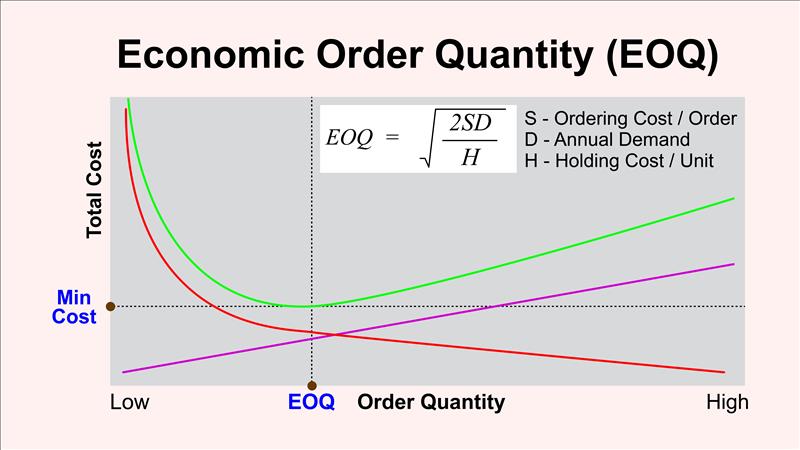
Economic order quantity is a conventional formula that minimizes the total inventory cost by calculating an ideal ordering size to balance between the lowest ordering cost and the lowest holding cost. This aims to meet customer demand without overstocking.
In the graph, you can see that as the ordering quantity increases, the ordering cost decreases. But overstocking increases the holding cost significantly. Your products may also expire if you hold them in the warehouse for a long time.
So, EOQ gives you a balanced number by analysing the ordering cost and holding cost.
The formula is EOQ = 2SDH , where S = Ordering cost, D = Annual demand, and H = Holding cost.
However, EOQ has some limitations. That’s why, in real-life inventory management, EOQ can’t always give you the optimal result.
Key issues with EOQ
- EOQ does not take production capacity or supply capacity into consideration
- It considers demand as a constant factor, but actually, it isn’t. Customer demand may vary with time.
- It does not tell you when to order. Shipments are received instantaneously when ordered.
How to achieve the Optimal Inventory Level
To optimize inventory, you have to answer three questions:
- How much to order?
- When to order?
- How to control?
If you have the correct answer to these questions, you’ll be able to provide quality service to the customers with a lower inventory investment. Now, to understand the optimal inventory management process, it‘s important to get introduced to some basic terms first.
Inventory position (IP)
Inventory position is the sum of on-hand products and the amount on order (not received yet), minus the backorders (the number of orders received from the customers but not served yet).
Replenishment time (RT)
Replenishment time is the duration from identifying the need and placing an order to refilling the inventory (receiving the product or material). It’s the total duration required to restock your inventory.
Reorder point (ROP)
Reorder point is the difference between the minimum inventory position and zero.
Replenishment time demand (RTD)
The gap or difference between the Minimum Inventory Position and the Minimum On Hand is the replenishment time demand. I’ll explain this later with a graphical representation.
Safety stock
To avoid overselling and customer dissatisfaction, you keep some products in safety stock. So, safety stock is the distance between the Minimum On Hand and zero. You can also get the safety stock number by deducting RTD from ROP.
Safety Stock (SS) = ROP – RTD
Reorder Quantity (ROQ)
The total amount of products you order each cycle.

On the graph, you can see the green line, which is the On Hand Inventory. The gray line is the Inventory Position, which is the sum of on-hand products in your warehouse plus the products on order (not received yet), minus the backorders. When the inventory position is equal to the reorder point, you place an order.
In this ideal situation, your backorder is zero; therefore, the inventory position would be the on hand plus on order. The gray line shoots up in the middle of the green line because that’s where you place an order to restock inventory. It goes up and joins again with the green line when you receive the shipment. This is your replenishment time— the time between the order placement and receiving the shipment.
We’ve shown a uniform inventory here, but in a real scenario, you’ll have variations in demand and replenishment time. Customer demand and supplier capability both may change over time. I don’t want to go too technical into the maths, but let’s jump into how you control inventory.
You should continually track your inventory position. That means your IT systems should keep tracking every incoming and outgoing item, along with the demand for those items. Most modern inventory software includes advanced features to monitor inventory levels.
In our example, the RTD is less than the ROP, which is why the safety stock is positive. But when the RTD is greater than ROP, you’ll have negative safety stock. That means you’ll have backorders there. The inventory position should never fall below ROP+1, and never exceed ROP+ROQ.
Appropriate tools and automation make inventory management easier; however, you can also hire a reliable assistant if you think you need professional help managing your inventory.
Top 8 Inventory Management Tools for Shopify
Based on business type, needs, and scale, there are dozens of Shopify inventory management software solutions, from basic to industry-grade. With the recent AI revolution, businesses can use AI-powered tools to manage inventory more efficiently.
I recommend these 8 professional tools because of their incredible features, reasonable pricing, integration with common platforms, user-friendly interfaces, scalability, automation, and comprehensive reporting.
01. Shopify’s built-in inventory management tool
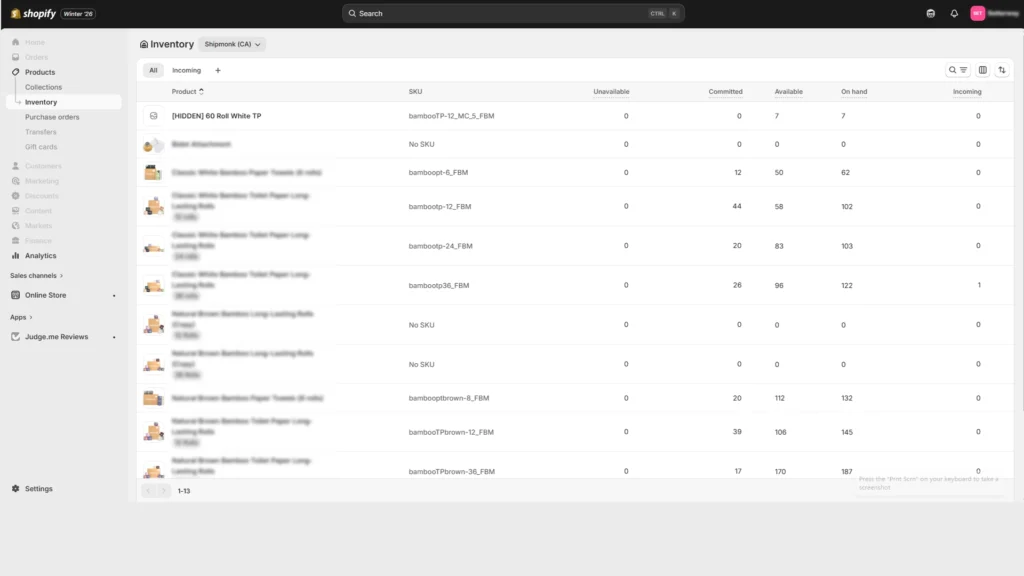
Shopify has its own inventory management tool for all users. It’s integrated with the platform and free to use regardless of the plan you pay for. It’s easy to use, reliable, and scalable.
The Shopify inventory management tool has all the essential features to manage and track extensive inventories. You can also enable inventory alerts and manage multi-location inventories.
Once you are done setting up your Shopify store, add all the necessary inventory information, including SKU, while listing the products. It’ll automatically start tracking your inventory.
Pricing
Shopify’s built-in inventory management tool comes for free when you purchase a plan.
Benefits
- It’s pre-integrated with the platform; no installation needed
- Real-time inventory tracking across all locations
- User-friendly interface, making it simple to use for all store owners
- Additional app support from the Shopify app store
Limitations
- Limited syncing, especially if you have a complex inventory with multichannel selling across platforms.
- As a business grows and requires advanced inventory features, it may require installing additional paid apps from the Shopify App Store.
- Lack of advanced forecasting and reporting
02. Oracle NetSuite
Among third-party tools, NetSuite is my top recommendation that can be easily integrated with a Shopify store. It is a cloud-based ERP software with inventory management features, allowing you to track products across multiple sales channels (digital + physical).
This tool helps you avoid stockouts by real-time tracking and updates. It analyzes different historical and seasonal data for effective forecasting.

Pricing
Oracle NetSuite charges a one-time implementation fee, and then you renew your license every year. The price depends on modules and the number of users.
Benefits
- Suits stores of any size
- Trusted solution to track every product across all sales channels and warehouses
- Demand-based planning and forecasting by analyzing historical and seasonal data
- Comprehensive solution for more efficient and cost-effective inventory management
- Optimizes inventory with intelligent fulfilment, reducing handling and shipping costs.
Limitations
- High cost, especially for small startups
- Complex and lengthy implementation
- I haven’t found their customer support very responsive
- The user interface can be overwhelming for new users
03. Lightspeed Retail
Developed by Lightspeed Commerce Inc., Lightspeed Retail is a cloud-based POS (point of sale) software that is capable of syncing physical inventory across all locations to an e-commerce store. It imports vendor catalog files to update product information and generate accurate reports.
Shopify stores can easily install this lightweight and mobile-responsive software to automate their inventory.

Pricing
The basic package starts at $89 per month. Besides, Lightspeed Retail offers a free trial
Benefits
- Being a fully cloud-based solution, Lightspeed lets you access sales, inventory, and all other information anytime on any device
- It’s a complete POS system, including inventory management, customer tracking, and employee management
- Advanced inventory features
- Syncing all sales channels and integrating all platforms
- Mobile-friendly inventory management software
Limitations
- Great for small and medium stores, but may struggle with highly complex and large-scale inventory management
- Analytics reports are limited to 5,000 rows
- Excessive data may cause reporting to break
04. Sumtracker
Sumtracker is a convenient tool that integrates with e-commerce platforms like Shopify, Amazon, Etsy, eBay, etc., and assists in optimizing inventory across multiple locations. It uses historical data to generate reports and allows partial stock reception against your purchase order.
It is designed to manage, track, synchronize, and update Shopify inventory in real time using purchase orders, price lists, and other relevant product information.

Pricing
The basic plan of Sumtracker is $49 per month. They currently offers 10% discount on annual plans and a 14-day free trial.
Benefits
- Synchronization of inventory across multiple e-commerce platforms and locations
- They have solutions for businesses of any size
- Uses historical data to forecast demand and automate replenishment
- Offers features like low-stock alert, stock valuation, and comprehensive reports
- Handles the Purchase Order System and the receiving of the inventory efficiently and effectively.
Limitations
- There might be delays and glitches in synchronization
- Mobile functionality is limited, and the user interface is non-intuitive for some of my clients
- Reporting is comprehensive, but report customization is very limited.
05. Katana Cloud Inventory
Katana is the best choice for manufacturers who also need to manage the raw materials, work-in-progress, and finished products. This enhanced solution integrates with Shopify, WooCommerce, QuickBooks Online, Etsy, eBay, Amazon, Salesforce, and dozens of other platforms and tools.
It’s especially beneficial for Shopify store owners who want to optimize inventory, manufacturing process, bundles, and multi-location fulfilment with a tool that also supports lots of third-party services.

Pricing
A basic version of the software comes for free. Paid plans start at $359 per month. For businesses that require more advanced features, Katana offers higher-tier plans.
Benefits
- It easily integrates with Shopify, offering real-time tracking and synchronization of multilocation inventory systems
- Focuses on manufacturing and raw materials management with features like manufacturing resource planning (MRP) and bill of materials (BOM) management.
- Effective inventory planning and forecasting
- Auto stock movement and Inventory transfer between sites
- Integrates with dozens of third-party services
Limitations
- The paid plans are a bit pricey for small businesses
- Lower-tier plans lack essential features like batch tracking
- Some users find it complex to track manufacturing workflows
- Katana does not have a dedicated mobile application, limiting on-the-go Shopify inventory management
06. Cin7
Cin7 Core is a web-based inventory solution for small and medium businesses, such as manufacturers, wholesalers, retailers, and e-commerce entrepreneurs. It is a scalable and multi-module tool with advanced tracking features.
This all-in-one solution works with hundreds of apps and platforms, including Xero, QuickBooks Online, Amazon, Shopify, PayPal, Hubspot, and Stripe.

Pricing
The standard plan of Cin7 Core costs $349 per month.
Benefits
- Optimizes centralized Shopify inventory management with a 360-degree view of costs, sales, and inventory status
- Simplifies inventory management with multi-channel tracking and real-time updates
- Accelerate business growth by streamlining sourcing, warehouse productivity, and fulfilment processes
- Facilitates wholesale businesses with a convenient self-serving portal
- Reduces manual input and errors with bots that handle routine tasks
Limitations
- There are complaints of system bugs and reliability issues
- Customer support response time is not satisfactory for some users, as I heard
- You may sometimes face technical complexities in integrating it with other software.
07. Stock Sync
syncX: Stock Sync manages inventory and simplifies synchronization across multiple sources. It is ideal for e-commerce stores that source products from multiple suppliers. With advanced automation features, Stock Sync helps with accurate product details updates, maintaining inventory levels, and migrating products to your stores.

Piricing
The basic plan of syncX: Stock Sync is free. The paid plans start at $7 per month.
Benefits
- Automates inventory updates with accuracy to minimize manual work
- Supports a wide range of file formats like CSV, XML from Google Sheets, FTP, ERP, or WMS
- Ideal for both new and existing stores
- Low-cost solution for newcomers
- Sets quantity rules and removes or archives discontinued items to avoid overselling
Limitation
- The software is easily customizable, but some users find the interface and the initial setup a bit complex
- The free plan includes limited customer support
- There might be syncing errors and technical issues sometimes
08. Assisty Shopify Inventory Management
Assisty is the last Shopify inventory management tool in my list, but it is a popular option for inventory replenishment and forecasting. It’s also good for multi-location tracking of extensive inventories.
Assisty helps you to stay in control of your inventory, avoiding overstocking and overselling. It reminds you at the right time to reorder the ideal quantity. Moreover, you can customize the solution for tailored reporting.

Pricing
Assisty has a free plan for beginners. The basic Shopify paid plans start at $19 per month.
Benefits
- AI-powered demand forecasting lets you reorder the right quantity at the perfect time
- Efficient replenishment saves time and money while increasing customer satisfaction
- Product performance analytics helps with strategic decision-making
- Centralized replenishment manages stocks across multiple suppliers and store locations
- Purchase order automation minimizes manual work
Limitations
- Some users find the app interface confusing and non-intuitive
- Pricing changes periodically
- Support is not very responsive when the app does not work
These are the top Shopify inventory management tools I suggest to my clients, who are mostly busy entrepreneurs looking for a professional solution to manage their inventory. With the AI revolution, apps are bringing new, exciting features for automation and comprehensive reporting. Even then, many store owners consider professional e-commerce virtual assistants to help them manage their inventory.
Common Inventory Mistakes & How to Avoid Them
Shopify is a reliable platform trusted by thousands of entrepreneurs worldwide. It’s easy and pre-configured with all the essential features. However, if you don’t know how to manage your inventory efficiently and effectively, your Shopify store can’t grow and generate the expected profit.
Check the common inventory mistakes most store owners make that hinder their success. I’ve also suggested how you can avoid those mistakes.
Overstocking or understocking products
The lack of accurate analytics and demand forecasting results in either overstocking or understocking products. Overstocking will increase your inventory cost, while out-of-stock products will dissatisfy customers.
To overcome this, use an automated inventory replenishment system that has multi-location tracking and advanced forecasting features. There are professional tools that also analyze seasonal data for accurate demand forecasting.
Not using SKU and Barcodes
SKUs and Barcodes are crucial for the Shopify inventory management system. In fact, all successful businesses (digital or physical) maintain SKUs and Barcodes to manage their inventory.
Use a standard SKU system for all of your products across all the stores and warehouses. Inform all your staff if you ever want to change or upgrade the system.
Poor organization and tracking issues
Inventory becomes the most critical part of a business when you do not organize and track your products properly. Especially if you sell through multiple sales channels across different digital platforms or a physical store, it becomes more difficult to track your products.
A holistic inventory management software with real-time tracking across all your sales channels can solve this issue. Use a reliable app based on your business needs and budget.
Bundle management issues
Many store owners neglect components of a bundled product (Kit) and variants (color, size, material, etc.) while listing the products. It creates massive issues in inventory management.
Stay super careful to manage product variants and bundles. Use automated tracking features and customize the app you use, if needed.
Inventory Reports: What You Should Track
A detailed and accurate report is important to make data-driven decisions. It can help you to improve efficiency, reduce costs, and optimize your overall business operations. But what should an inventory report contain?
An inventory report includes a detailed summary of the products and the stock level of your store. While a summary report usually contains the basic stock level, a detailed report may have more complex data that needs attention.
Here is a list of what a comprehensive inventory report should cover:
- Stock on hand: The exact quantity of products and materials you have in your warehouse.
- Product performance: Contains which products are flying off your shelves. Professional softwares generate seasonal performance data.
- Cost of goods sold (COGS): Direct costs of producing or acquiring products sold in a specific period.
- Inventory valuation: How much the stock is worth (value per unit and the total valuation) in a given period.
- Product movement: Product migrations across different locations and warehouses.
- Stock reorders: Shows the replenishment time and the reorder points when you need to reorder to maintain the stock level.
- Inventory health: Overview of current inventory status, age, turnover, performance, etc.
- Supplier analysis: Supplier performance, delays, order accuracy, among others.
- Shrinkage report: Loss of inventory between the point of manufacturing or acquisition and the point of sale
Final Thought
Although often forgotten when planning an e-commerce business, you can never ignore inventory. Customer satisfaction and the overall business cost depend on how you manage your inventory.
A complete Shopify inventory management tool now comes with lots of advanced functionalities to help you with automation. However, I would advise you to pay attention to and audit your inventory from time to time to avoid a mismatch in yearly reports.
FAQs
01. Is there inventory management in Shopify?
Answer: Yes, Shopify has an effective built-in inventory management system that can track products across multiple locations. It is capable enough to handle small to mid-sized inventories, and you can integrate additional services from hundreds of options through the Shopify App Store.
02. How to enable inventory tracking on Shopify
Answer: You can enable inventory tracking on the Shopify product pages in your admin panel. View or manage inventory counts later on the “Inventory” tab from the left-hand sidebar.
To enable inventory tracking on the products page, activate the inventory tracking button (usually activated by default) on the right-hand side of the “Inventory” section.

Enter the quantity, location, SKU, and other relevant information, and Shopify will automatically track the product across all locations.
03. How to change Shopify inventory location to a third-party?
Answer: To change Shopify inventory to a third-party location, first, add the third-party location as a new location under Settings>Locations. When it’s added, change the location of the particular product on the inventory page. To do that, go to Products>Inventory.
04. How to effectively track inventory and variants?
Answer: You can effectively track inventory using a robust inventory management software that automates tracking across all locations, including product variants. Use either Shopify’s built-in inventory tracking system or a reliable third-party solution.
Maintain a consistent SKU naming convention for each variant. Use real-time tracking and a centralized stock count, including all sales channels.
05. How can I get location-based inventory data?
Answer: On Shopify, you can easily get location-based inventory data by enabling multi-location tracking and adding all your inventory locations to your store. To do that, go to Settings>Locations in your admin panel. Add all the locations and their status.
Next, go to Products>Inventory and allocate existing products to their respective locations. That’s it, you’ll get location-based inventory data onward. Whenever you list a new product again, add quantity based on their locations in the “Inventory” section of the product page.