Hiring a Shopify virtual assistant is the easy part. Getting them productive, independent, and useful within the first two weeks – that’s where the real challenge lies.
The problem usually isn’t the VA. It’s the onboarding process.
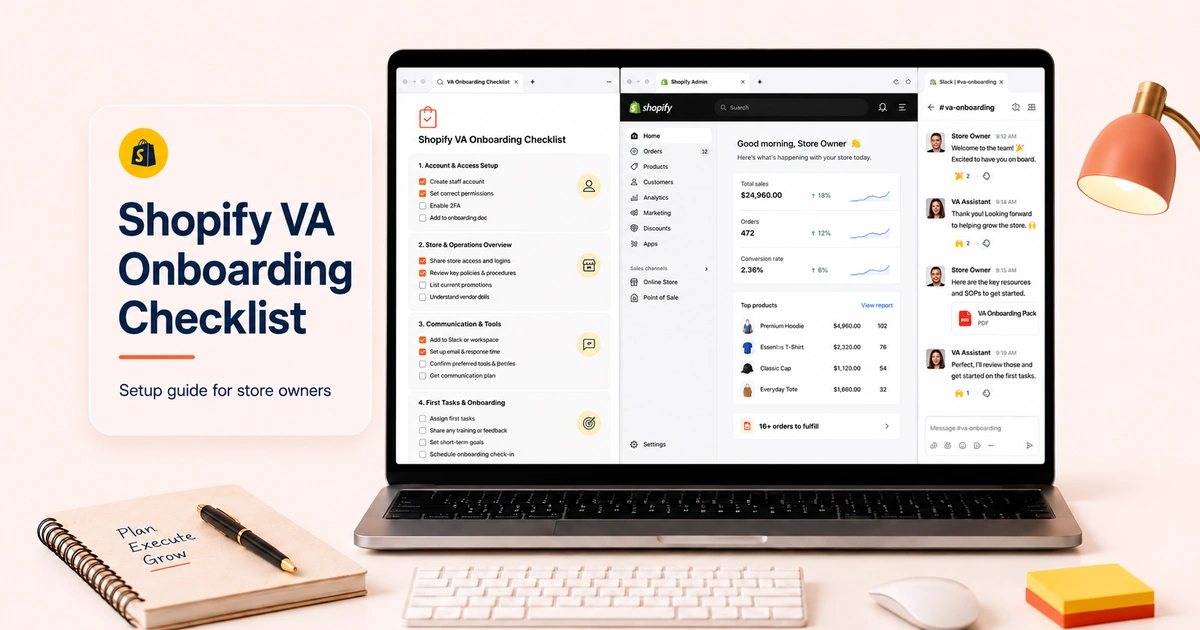
When a new VA starts without clear documentation, proper access, or a structured first week, they spend their early days guessing rather than contributing.
Then the obvious happens, and the store owner ends up concluding the VA “just wasn’t good enough”.
We don’t want you to go through the same circle. So, we created this solid Shopify virtual assistant onboarding checklist. With this, you’ll be able to ensure your VA has everything they need to perform well from day one.
Why Onboarding Determines Whether the Hire Works
Most VA engagements that fail do so within the first 30 days – and not because the VA was unqualified.
According to HubSpot’s research on remote workforce productivity, employees who experience structured onboarding are 58% more likely to still be with the organization after three years.
The same dynamic plays out in VA relationships as well; i.e., clear structure at the start produces reliable performance over time.
The stakes are concrete for a Shopify store. A VA handling your customer service without a brand voice guide will respond in ways that don’t match your tone. Or, one managing inventory without a documented reorder threshold will let stockouts happen before flagging them.
So, there’s no doubt an onboarding checklist is what bridges the gap between “they know Shopify” and “they know your Shopify store.”
Our 5-Phase Shopify Virtual Assistant Onboarding Checklist
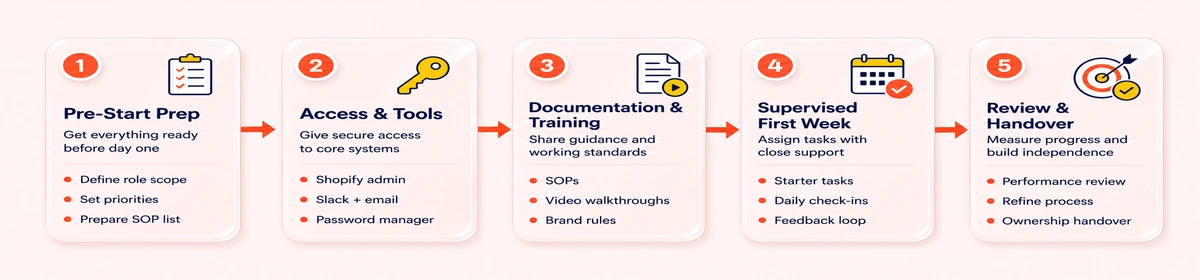
This 5-phase guide follows the natural sequence of getting a VA operational. Every phase has a clear set of actions and a clear outcome.
Phase 1: Pre-Start Preparation (Before Day One)
This phase happens before your VA ever logs in, and it’s the most important phase of the checklist. Everything the VA does in weeks one and two depends on what you prepare here.
Pre-start checklist:
- Define the VA’s role scope in writing: list the exact tasks they own, the tasks they support, and the tasks that stay with you.
- Write a brand voice guide: your tone with customers (level of formality, phrases you use and avoid, how to handle complaints, how to sign off emails).
- Document your returns and refunds policy in detail: the rules, the edge cases, and the escalation triggers that require your involvement.
- Create a product upload template: your title format, description structure, image requirements, tagging conventions, and collection assignment rules.
- Write a basic escalation protocol: what the VA handles independently vs. what they must flag to you before acting.
- Decide on your communication channel: Slack, email, or WhatsApp (set expected response times in both directions).
- Set up a shared task tracker: Asana, Notion, Trello, or a Google Sheet, whichever fits your working style.
This doesn’t need to be a 50-page manual. A Google Doc covering these six areas is enough to start. The goal is that your VA can look up the answer to most day-to-day questions without needing to ask you.
Phase 2: Access and Tools Setup (Day One)
On the first day, your job is to get them into the systems they need with the right level of access, and with a brief walkthrough of each tool.
Access setup checklist:
- Create a Shopify staff account for the VA: do not share your owner login
- Scope the staff permissions to match the role: products and inventory access for a product VA, orders and customers for a customer service VA, reports for an admin VA
- Share access to your customer service platform if applicable (Gorgias, Zendesk, or Freshdesk)
- Share access to your inventory management app if you use one (ReStock, Inventory Planner, or Skubana)
- Add them to your communication channel (Slack workspace, WhatsApp group, or email thread)
- Share the task tracker and walk them through how you use it
- Provide read-only access to your Google Analytics or Shopify reports dashboard if their role involves reporting
- Confirm they have access to your SOP documents and can navigate them
Note: Shopify’s staff accounts let you control permissions at a granular level – products, orders, customer data, reports, apps, and more. Give your VA access to exactly what their role requires and nothing beyond that. The Shopify Help Center has a full walkthrough of staff permission settings.
Phase 3: Documentation, Training, and Task Walkthrough (Days 1–3)
Phase 3 is where you transfer knowledge. The goal isn’t to train the VA on Shopify since they already know the platform. The goal is to train them on your store: your voice, your processes, your standards, and your preferences.
Documentation and training checklist:
- Walk the VA through your SOP document: don’t just send it, go through it together so they can ask questions in real time
- Record a Loom or screen-share walkthrough of your product upload process: this is faster than writing a second tutorial and easier for the VA to reference later
- Walk through a live example of each task type in their scope: upload one product together, process one test order, respond to one sample customer email
- Explain your quality bar: what “good” looks like for each task, what “needs rework” looks like, and what “flag to me” looks like
- Cover your store’s common edge cases: frequently returned products, recurring customer complaints, or SKUs that have complex variant setups
- Set up a shared inbox or folder where the VA can save drafts for your review before sending (important for customer service in the first week)
- Agree on how the VA will ask questions: a dedicated Slack channel, a daily question batch, or a specific time window so neither of you gets interrupted constantly
Note: The VA should finish Phase 3 with the ability to handle 80% of their daily tasks without asking you anything. The remaining 20% – edge cases, judgment calls, anything with financial or reputational consequences – is what the escalation protocol covers.
Phase 4: Supervised First Week (Days 4–10)
The first full working week is supervised execution. The VA works through their task list, but everything material goes through a review step before it goes live or reaches a customer.
First-week supervision checklist:
- Set a daily output target: a specific number of tasks or a specific task list per day, not an open-ended “do what you can”
- Review all product uploads before they go live: check title format, description quality, image sequence, tagging, collection assignment
- Review customer service responses before they’re sent: check tone, accuracy, policy compliance, and brand voice match
- Review any inventory updates before they’re confirmed: check counts, check SKUs, check that reorder triggers are being applied correctly
- Run a short daily check-in for the first five days: 10 minutes, not a full meeting – to answer questions, clarify anything in the SOP, and calibrate early
- Flag calibration issues immediately and specifically: “this description doesn’t follow the template” is useful; “it needs work” is not
- Document any recurring questions the VA asks not covered in the SOP: those gaps become additions to the documentation by the end of the week
By day 10, you should have a clear picture of the VA’s working style, their accuracy rate, and their judgment in ambiguous situations.
If calibration is good, Phase 5 moves to lighter-touch oversight. But if there are consistent issues, address them in the review before extending the scope.
Phase 5: First-Month Review and Independent Handover (Days 11–30)
Phase 5 is the transition from supervised to independent. The VA takes on their full task scope with a reporting structure that keeps you informed without requiring your constant involvement.
First-month handover checklist:
- Move to async review: the VA completes tasks independently, flags exceptions via Slack or the tracker, and you review the output daily rather than in real time
- Shift from daily check-ins to a weekly summary: the VA sends a brief weekly report covering what was completed, what was flagged, and any patterns or issues worth noting
- Review the first-month output as a whole: are quality standards being maintained? Are escalation calls being made correctly? Is the VA improving or plateauing?
- Expand scope gradually if performance warrants it: add a second task category or a new responsibility once the first is running reliably
- Update the SOP with anything learned during the first month: processes that changed, edge cases that came up, standards that were clarified
- Confirm the reporting cadence going forward: weekly summaries, monthly reviews, or a shared live dashboard depending on the role’s complexity
How Long Does It Take to Onboard a Shopify Virtual Assistant?
A realistic onboarding timeline for a Shopify VA looks like this:
| Timeframe | What Happens |
| Days 1–3 | SOP documentation complete, access set up, walkthrough done |
| Days 4–10 | VA works through task list under full review |
| Days 11–20 | Async review, fewer check-ins, scope holds steady |
| Days 21–30 | Independent operation with weekly reporting |
| Month 2+ | Full independence, scope expansion where earned |
The total onboarding period is usually 30 days. VAs who join with strong Shopify experience and a clear SOP to work from can reach reliable independence by day 14–18. And those starting with a less detailed setup, or taking on a broader scope, may need the full 30 days.
The variable that matters most isn’t the VA’s experience level, it’s the quality of the documentation you give them. A highly experienced VA working from vague instructions takes longer to become reliable than a mid-level VA working from a detailed, well-structured SOP.
Onboarding Mistakes to Avoid
Now, check these patterns known to produce poor outcomes:
Sharing the Owner Account Instead of Creating a Staff Account
This gives the VA unrestricted access to everything and removes your ability to control what they can and can’t touch. Always use Shopify’s staff account system.
Sending the SOP Document Without Walking Through It
A document read in isolation produces a different understanding than one discussed in real time. Walk through it together on day one, answer questions as they come up, and note anything that needs clarifying.
Going Straight to Full Independence
Skipping the supervised first week is the single most common onboarding mistake. It’s also the most expensive.
Errors in product listings, customer emails, or inventory updates that aren’t caught in the first week compound – and they’re harder to correct after the fact.
Delegating Tasks Without Defining the Quality Standard
“Handle customer service” means something different to everyone.
Here’s a job description: “Respond to customer emails within 4 hours using the tone in the brand voice guide, process refunds under $50 independently, and flag anything involving a dispute or threat of chargeback to me”.
No Escalation Protocol
Every VA might face a situation their SOP doesn’t cover. Without a clear escalation path, they either guess (which creates risk) or ask you every time (which defeats the purpose). Build the escalation protocol before day one.
Expecting Full Output in Week One
Don’t expect full productivity in the first week. Expecting the same output as month three from a VA on day three will lead to frustration on both sides.
Tools We Recommend for Shopify VA Onboarding
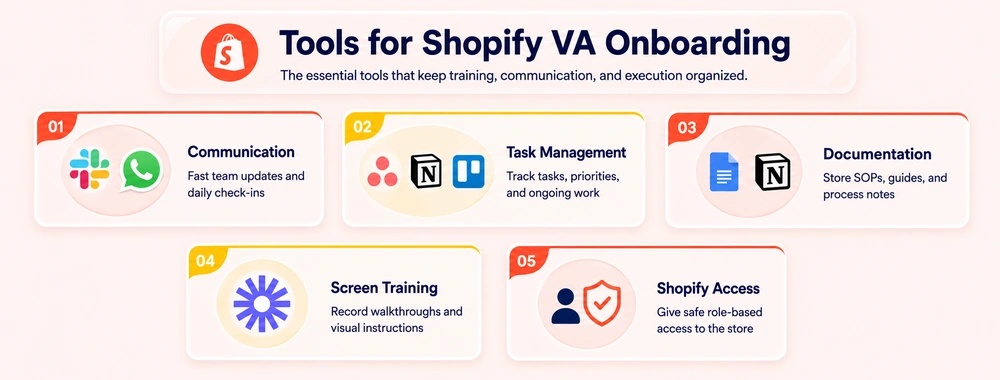
Getting the tooling right from the start makes the ongoing relationship significantly easier to manage. So, check these out:
Best for Communication
Slack is the most widely used tool for founder-VA communication in ecommerce. It keeps conversations organized by channel, supports async communication across time zones, and integrates with Shopify notification apps. However, WhatsApp works for smaller operations where a lighter setup is preferred.
Best for Task Management
Asana and Notion are both strong choices for tracking VA work. Asana works well for task-based roles (daily to-do lists, recurring task templates). Notion works well for knowledge management alongside task tracking – your SOP lives in the same workspace as your project management, which reduces context-switching.
Best for Documentation
Google Docs for SOPs and process guides – easy to share, easy to update, easy for the VA to access without needing additional software. Pair with Loom for screen-recorded walkthroughs of complex processes.
Best for Training Walkthroughs
Loom is the fastest way to record a process guide. You can record yourself completing a product upload, processing a test order, or navigating your customer service workflow. The VA can rewatch it as many times as needed without requiring your involvement each time.
Best for Shopify Access
Shopify’s native staff accounts – no third-party tool needed. Set permissions correctly on day one and you don’t need to revisit them.
How to Delegate Tasks to a Shopify Virtual Assistant Effectively
Task delegation isn’t a one-time event – it’s an ongoing practice that improves as the VA builds store knowledge and the SOP develops to match.
Here’s a framework that works for us:
- Define the task clearly (what it is, what the output looks like, what the standard is),
- Give the VA the resources to complete it (SOP section, example, template), define the review loop (who checks it, before or after it goes live), and
- Set the reporting expectation (when does the VA report back, and in what format).
The one principle that cuts across all task types: delegate outcomes, not just activities.
For instance, “Upload 10 products today” is an activity. “Ensure 10 products are live, fully optimized to the product upload template, and correctly tagged and collected by end of day” is an outcome.
The difference is significant when you’re reviewing the work.
The Complete Onboarding Checklist at a Glance
| Phase | Key Actions | Outcome |
| Phase 1 – Pre-Start | Role definition, SOP, brand voice, escalation protocol | VA has everything they need before day one |
| Phase 2 – Access | Shopify staff account, app access, comms tools, task tracker | VA can log in and navigate the store correctly |
| Phase 3 – Training | SOP walkthrough, live task demos, quality bar explained | VA understands your standards, not just the platform |
| Phase 4 – First Week | Daily output targets, full review before live, short daily check-ins | Calibration issues caught and corrected early |
| Phase 5 – Handover | Async review, weekly reporting, scope expansion | VA operates independently with clear reporting |
Closing Thoughts
If you religiously follow this Shopify virtual assistant onboarding checklist, you’ll have a reliable operational asset by your side.
We’ve seen most onboarding failures are documentation failures. So, give your VA the context they need, set the quality standard clearly, and build a feedback loop that catches calibration issues early.
FAQs
1. What is a Shopify virtual assistant onboarding checklist?
Ans: A Shopify virtual assistant onboarding checklist is a structured guide that covers everything needed to get a new VA operational – platform access, SOP documentation, task training, supervision protocols, and a first-month review process. It ensures the VA has the context, tools, and direction to perform their role independently from the start.
2. How long does it take to onboard a Shopify virtual assistant?
Ans. Full onboarding typically takes 30 days. The first three days cover access setup and training. Days four through ten are a supervised first week. Days eleven through thirty transition to independent operation with weekly reporting. VAs with strong Shopify experience working from a detailed SOP often reach reliable independence by day 14–18.
3. What should be included in a Shopify VA onboarding process?
Ans: A complete onboarding process includes role scope definition, brand voice and SOP documentation, Shopify staff account setup with scoped permissions, a live walkthrough of each task type, a supervised first week with output review, and a structured handover to independent operation with a weekly reporting cadence.
4. What tools do we need to onboard a Shopify virtual assistant?
Ans: The core toolkit is Shopify staff accounts for platform access, Slack or WhatsApp for communication, Asana or Notion for task management, Google Docs for SOP documentation, and Loom for screen-recorded process walkthroughs. None of these require significant cost – most are free or low-cost for the level of usage involved.
5. How do we delegate tasks to a Shopify virtual assistant effectively?
Ans: Define the task outcome clearly (not just the activity), provide the SOP section or template the VA needs to complete it, set a review loop (what gets checked and by whom before going live), and agree on the reporting format. Delegate outcomes rather than activities – this makes quality assessment straightforward and keeps standards consistent.
6. What are the most common Shopify VA onboarding mistakes?
Ans: The most common mistakes are sharing the owner account instead of a staff account, skipping the supervised first week, sending SOP documents without walking through them, and failing to define an escalation protocol. Each of these creates predictable problems – access issues, calibration errors, misunderstood standards, and unresolved edge cases – that are avoidable with preparation.
7. Can we onboard a Shopify VA remotely?
Ans: Yes – and most Shopify VA relationships are entirely remote. Remote onboarding works well when communication tools are set up on day one, SOP documentation is thorough, and the first week includes short daily check-ins via video or Slack. Loom screen recordings replace in-person walkthroughs effectively. Time zone differences are manageable with async communication structures.
8. When should we expand a Shopify VA’s task scope?
Ans. Expand scope after the first task category is running reliably – typically by the end of the first 30 days. Add one new responsibility at a time rather than expanding broadly at once. Each new task category should follow the same structured introduction: SOP documentation, a live walkthrough, and a brief supervised period before full independence.